
OregonLive.com
OregonLive.com | Oregonian Media GroupNews & Magazines
2.9367.00 Reviews
- Version
- 5.0.0
- Installs
- 50.00K
- Age Rating
- Teen
Screenshots




Our Review of OregonLive.com
 Analysis by Appyee
If you want a closer view of what is happening around Oregon, OregonLive.com brings local reporting, sports, weather, jobs, and entertainment together in one news app. I see its main appeal in that regional focus: it can help you follow the place you live, work, or care about without relying only on national headlines. It is free to download, though in-app purchases are offered, so I would check the terms before committing to any paid access.
Getting Started and Finding a Rhythm
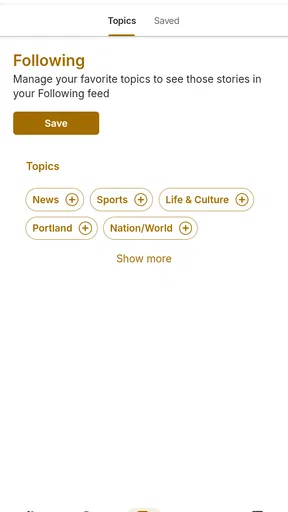
First things first, downloading the app is a breeze. It is available for Android and iOS, and it won't take up much space on your device—which is always a plus. Once installed, the app welcomes you with a clean and straightforward interface. No fluff or unnecessary clutter here, which makes navigating through the app a piece of cake.
Quick Checks for Local News
Now, let’s talk about the real meat of the app: staying informed. Whether you’re interested in local news, politics, or sports, this app has you covered. The articles are well-written, concise, and packed with information. I found myself quickly swiping through headlines every morning to get a sense of what’s happening around me.
The app also lets you customize notifications. So, if you're a sports fanatic, you can choose to get alerts about your favorite teams. Personally, I loved being able to keep tabs on the Trail Blazers without having to manually check the app every time. Just set it and forget it!
That notification approach works best when you decide in advance what deserves an interruption. I would reserve alerts for a team or subject I genuinely follow, then use a quiet headline check for everything else. That keeps a local news app useful rather than turning every update into another reason to pick up the phone. If you are mainly interested in Oregon headlines and only occasionally want sports, there is no need to treat every section as equally important.
Reading Beyond the Headlines
One feature I found particularly nifty is the offline mode. You can download articles to read later when you don’t have internet access. This came in handy during my morning commute when I wanted to catch up on news without burning through my data.
A practical way to use that option is to save a few pieces while connected, then open them before leaving home or work. That makes offline reading a planned part of a commute, not something to rely on after a connection has already disappeared. I would also treat saved articles as a reading queue rather than a complete live feed: anything time-sensitive, especially weather or breaking news, is better checked when you are back online.
Another cool aspect is the multimedia content. While the app is primarily text-based, it includes videos and photo galleries that enhance the storytelling experience. It's like having a mini news channel in your pocket!
Photos and video can make a local story easier to understand, but they also change the best time and place to read. If I am on a crowded bus or trying to conserve attention, I would start with the text and save media-heavy pieces for later. That is a useful trade-off for anyone who wants a quick headline scan in the morning but still wants the option of a richer report when there is time to sit down.
How It Feels During a Busy Day
The design is intuitive, and the app runs smoothly for the most part. I did experience a couple of minor glitches where articles wouldn’t load properly, but closing and reopening the app usually fixed the issue. The developers seem pretty responsive to feedback, so I'm optimistic these hiccups will be ironed out in future updates.
For a heavier-use moment, imagine checking an Oregon story before a meeting, then returning later to follow a game and browse an entertainment item. The benefit is having those local interests in the same place; the drawback is that a slow or failed article load can interrupt the quick-check habit. My simple recovery step would be to close and reopen the app, as that resolved the loading trouble I encountered. If the same item still will not open, I would switch to another task and try again later rather than assume every section is equally available at that moment.
Navigation is a cinch. You can quickly jump between different sections like news, sports, and entertainment with just a few taps. Plus, the search function is pretty robust, allowing you to dig up older articles with ease.
Search is particularly handy when a local issue develops over several days. Instead of repeatedly scanning the full stream, I would search for the subject or place I remember and use older coverage to get context. That workflow is more useful than a general headline feed when you are following one continuing story. It also makes the app a better fit for residents who want to revisit coverage after an initial alert has passed.
Who Will Get the Most from It
If you live in Oregon, regularly visit, or have family and interests there, the regional emphasis is the clearest reason to keep the app around. A reader who wants local reporting alongside sports, weather, jobs, and entertainment may find it more convenient than moving between several broad news apps. It can also suit someone who checks headlines in short bursts rather than sitting down for a long reading session.
By contrast, if your main priority is a broad national or international perspective, a general news service may be a better first stop. This app’s value is strongest when Oregon is central to what you want to know; it is not a substitute for every kind of reporting. Likewise, someone who only wants weather conditions could prefer a dedicated weather tool, while a reader who follows many leagues and teams may want a specialist sports app for deeper coverage. I would use those alternatives for their specific strengths and keep this one for the local angle.
The audience rating is a modest 2.6 from around 670 ratings, a reason to approach it with measured expectations rather than assume a flawless experience. It has more than 50,000 installs, showing that it has reached a meaningful group of readers, but popularity alone does not settle whether its navigation and article loading suit your device. The useful test is whether its Oregon focus earns a place in your daily routine.
Access, Cost, and Device Fit
The app is free to install, and its content rating is Teen. In-app purchases range from $7.99 to $100 per item, so I would pay attention to any purchase prompt and confirm what it covers before proceeding. A free download does not mean every possible purchase is included, and anyone who only wants occasional headlines should decide whether the basic experience meets that need before spending money.
The app comes from OregonLive.com | Oregonian Media Group. It was released on February 19, 2011, and its current version is 4.5.2.2. The listed minimum operating-system requirement is version 8.0. Those details help with basic compatibility decisions, but they do not guarantee identical speed or stability on every phone. On an older device, I would keep expectations modest, leave room for the operating system to run comfortably, and judge the app by how it handles ordinary headline checks rather than assuming every video or article will feel instant.
For everyday use, the lightest workflow is to open it when you want a local briefing, read a few stories, and leave longer pieces for a better moment. That reduces needless background checking and makes notifications more purposeful. If you are concerned about data use, offline article downloads can help with text you have chosen in advance, while video is better saved for a connection and situation that suit it.
Why You Should Give It a Try
So, why should you download it? Well, if you're someone who likes staying updated with what's happening locally, this app is a no-brainer. It's efficient, easy to use, and packed with content that caters to a wide range of interests.
In an age where information is constantly flowing, having a reliable source like OregonLive.com at your fingertips is invaluable. Whether you're sipping your morning coffee or waiting for your next meeting, this app is your ticket to staying informed without the hassle.
For me, the strongest recommendation is for Oregon-focused readers who want one convenient starting point and are comfortable with the occasional loading hiccup. I would not choose it as my only source for national coverage, specialist weather, or deep sports analysis, but that is a question of fit, not a reason to dismiss its local role. If you are unsure, try the free app for a few ordinary days: check a morning headline, follow one subject that matters to you, and see whether its sections and alerts feel useful rather than noisy.
In conclusion, it is more than just a news app—it is a portal to everything Oregon. So, if you haven't checked it out yet, I highly recommend giving it a download. Who knows? It might just become your go-to source for news!
Verdict
Strengths of OregonLive.com
- User-friendly interface for easy navigation.
- Real-time updates on local news and events.
- Customizable alerts for personalized content.
- Access to a wide range of multimedia content.
- Offline reading mode for convenience.
Limitations of OregonLive.com
- Ads can be intrusive and frequent.
- Some features require a subscription.
- Occasional app crashes reported by users.
- Limited international news coverage.
- Notifications can be overwhelming.
Other Releases by OregonLive.com | Oregonian Media Group
View All
The Oregonian
News & Magazines3.6
Similar Picks in This Category
View All
Google News - Daily Headlines
Google LLC4.0

X
X Corp.4.8

Flipboard:Your Social Magazine
Flipboard3.4

Opera News: breaking & local
Opera4.5

Hindi News by Dainik Bhaskar
Dainik Bhaskar Group4.0

Way2News Daily News App
Way2News ( Formerly Way2SMS )4.6
Frequently Asked Questions
What is OregonLive.com app and what features does it offer?
The OregonLive.com app is designed to keep users updated with the latest news, sports, and entertainment from Oregon and beyond. It offers features such as real-time news updates, personalized notifications, and the ability to save articles for offline reading. Its user-friendly interface ensures easy navigation through various categories and topics.
Is the OregonLive.com app free to download and use?
Yes, the OregonLive.com app is free to download on both Android and iOS devices. While most content is accessible without a subscription, some premium features or articles may require a subscription or account registration for full access. Always check the app store for any in-app purchase options.
How often is the content updated on the OregonLive.com app?
Content on the OregonLive.com app is updated in real-time, ensuring users receive the latest news and information as it happens. The app covers a wide range of topics including local and national news, weather, sports, and entertainment, all refreshed regularly to keep users informed.
Can I customize notifications in the OregonLive.com app?
Yes, the OregonLive.com app allows users to customize notifications according to their preferences. You can choose to receive alerts for breaking news, specific topics, or updates from particular categories. This ensures you only get notified about the news and events that matter most to you.
Does the OregonLive.com app require an internet connection to function?
The OregonLive.com app requires an internet connection to download and update content. However, it does offer an offline reading feature that allows users to save articles for later viewing without a connection. This is particularly useful for those who want to read on the go without using data.
